


DMD2
3.977.00 Reviews
App Specs
- Version
- 3.00282
- Updated On
- License
- Free
- Downloads
- 100,000+
- Developer
- DMD Navigation
- Categories
- Maps & Navigation
- Platform
- Android
Screenshots
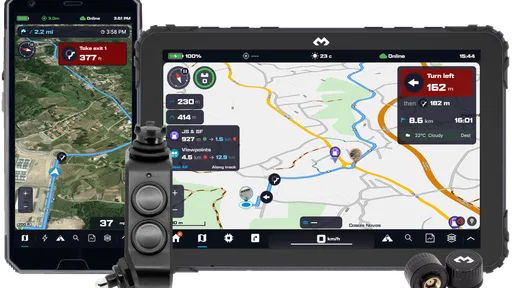
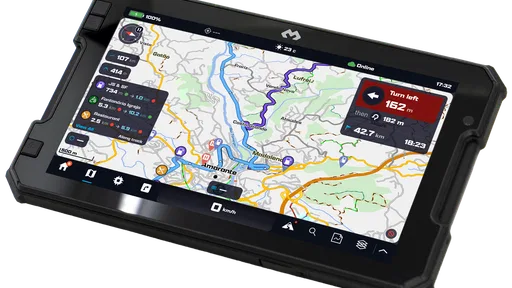
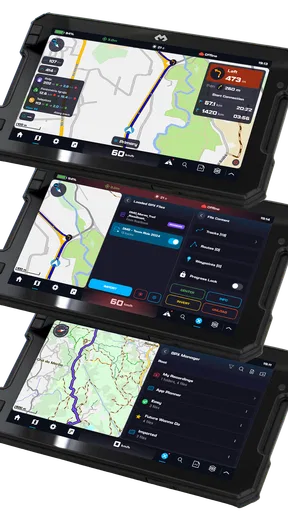
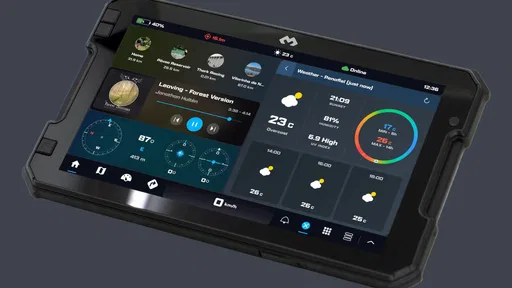
 Analysis by AppCompare
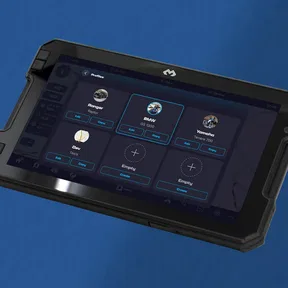
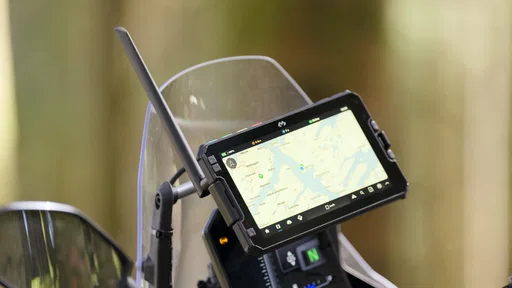
When several people share a motorcycle or plan rides together, the phone can become part of the bike’s cockpit as much as a personal device. That is the setting where I would consider DMD2: it is a motorcycle-focused navigation app from DMD Navigation, and its broader dashboard approach is aimed at riders who want route guidance and riding information in one place. I would not treat it as a general household map for every errand, but it can make sense when one person owns the riding setup and other people occasionally use the motorcycle or help plan a trip.
One motorcycle, more than one rider
A shared bike creates a practical problem that ordinary navigation apps do not always solve neatly. One rider may prefer a clean map, another may want a roadbook or vehicle information close at hand, and the person who owns the phone may not be the person riding that day. DMD2 is most interesting in this context because it is built around the motorcycle rather than around a single person’s everyday phone habits.
For a weekend ride, I would set up the navigation and the screen layout before handing over the bike. That avoids asking a passenger or a second rider to sort out menus while the motorcycle is moving. It also makes it easier to agree on the route while everyone is still parked. The useful household habit here is simple: decide who is responsible for the phone and route, and make changes while stopped.
This is not the same as a shared family account or a dedicated system for managing multiple profiles. I would not assume that each rider gets separate preferences or a private history. Instead, I would treat the installed app as part of the motorcycle’s shared equipment and make sure each person knows which settings have been changed. That small bit of coordination matters more than it might with a phone used only for walking directions.
Setting up the bike without turning it into a project
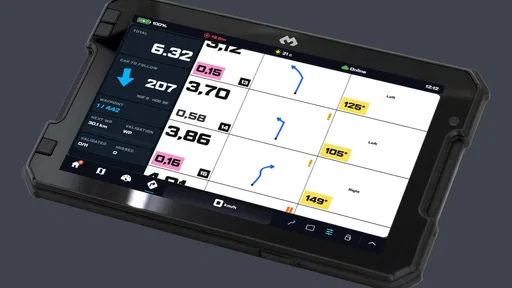
DMD2’s appeal is the combination of navigation with motorcycle-oriented dashboard functions, including roadbook and OBD-related tools. That range can make the first setup feel more involved than opening a standard map app and entering a destination. My advice is to begin with only the parts you need for the next ride: get comfortable with the navigation view first, then explore the other dashboard options when you have time and the bike is stationary.
That order is especially helpful if the phone is shared. One rider can establish a dependable basic layout, then explain the few controls another rider is likely to need. Avoid making several changes immediately before leaving; if the screen behaves differently on the road, it is harder to tell whether the cause was a layout choice, a connection, or an unfamiliar control. A short stationary test is a better use of time than troubleshooting at the roadside.
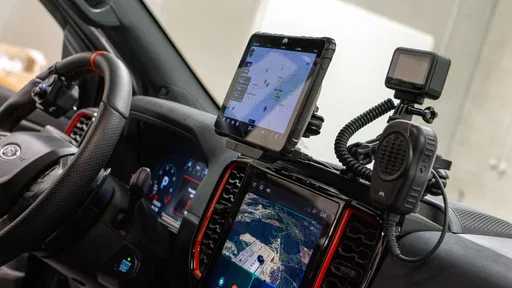
OBD-related functions also come with a practical boundary: they are relevant only if your riding setup supports the necessary connection and equipment. I would not buy the app expecting every motorcycle to expose the same information automatically. Check that your own bike and hardware fit the intended workflow before building a routine around those tools. For someone who only wants turn-by-turn directions, those extra possibilities may be unnecessary rather than a reason to choose this over a simpler navigator.
Worth Reading Before You Choose

Flipboard Shows What News Apps Must Do Beyond the Feed

Switching to Android Auto Means Rethinking Your Driving Routine

Google Calendar Makes a Crowded Week Easier to Manage

Ludo King Makes the Most of the Minutes Between Plans

Baby Panda World Brings Quick Play to Modern Phones, but Its Game Library Feels Busy

ESPN’s Live Game View Makes Following Close Games Easier
Coordinating routes and responsibilities
There is a difference between using a navigation app to reach a destination and using it as part of a group ride. DMD2’s roadbook-oriented side is potentially useful when the ride is planned around a route rather than just a final address. Before setting off, I would make sure the rider understands how the route is presented and what they need to watch on screen. A passenger can help with planning, but the person controlling the motorcycle should not be expected to read a complicated display while riding.
For a realistic household example, imagine one person commuting on the motorcycle during the week while another takes it on a longer weekend outing. The commuter may want a straightforward navigation setup, while the weekend rider may care more about a planned route and vehicle information. The sensible compromise is to keep a familiar basic screen available and make any ride-specific changes before the weekend trip. That way, returning the bike to everyday use does not require reconstructing the whole setup.
Compared with a typical phone-map app, DMD2 makes more sense when the motorcycle itself is the center of the task and the rider wants navigation alongside motorcycle-related tools. A conventional map app is usually the less demanding choice for occasional directions, quick searches, or a household member who has no interest in configuring a riding display. If your priority is simply getting from one address to another, the extra dashboard angle may add steps without improving the trip.
Age, trust, and sensible handoffs
The app is rated for Everyone, but that rating does not make it a toy or mean that every rider should use it without guidance. Navigation on a motorcycle calls for attention and judgment, and a younger or inexperienced rider should not be encouraged to interact with a phone while moving. I would have a new user learn the interface while parked and make clear that route changes belong at a safe stop.
On a shared device, trust is mostly about expectations rather than special family controls. Agree on who may alter saved routes or dashboard preferences, and avoid leaving the next rider to discover unexpected changes during a trip. If the phone belongs to one person, keep personal access and the riding setup distinct where the device allows; the app itself should not be assumed to provide household account boundaries. For a family that needs strict separate profiles, a setup designed around individual accounts may be a better fit.
DMD2 is free to download, with in-app purchases ranging from $3.49 to $134.99 per item. I would start with the free experience and identify a specific need before paying for anything. The wide gap between the lowest and highest listed purchase makes it particularly important not to treat every paid option as essential. A rider who only wants basic navigation should evaluate that use first, while someone with a clear need for expanded motorcycle functions can decide whether a purchase fits their actual equipment and routine.
The app has a 4.0 average from around 1.2 thousand ratings, and it has passed 100 thousand installs. It was released on October 22, 2020, and version 3.00265 requires Android 7.0 or later. Those figures give a sense of its presence and compatibility, but they do not tell me whether it suits a particular bike or rider; the best test is whether its motorcycle-focused layout solves a real problem in your own setup.
Who will get the most from it?
I would point experienced motorcyclists toward DMD2 if they want a navigation-centered dashboard and are willing to spend time setting it up. It is also worth considering for riders who regularly use planned routes, want roadbook tools, or have a compatible OBD arrangement and a reason to consult that information. A shared motorcycle can benefit when one person takes responsibility for configuring the device and gives other riders a clear, simple handoff.
I would steer casual users toward a standard navigation app if their needs stop at entering an address and following directions. I would also hesitate to recommend this as the household’s universal map application: its motorcycle emphasis is a strength for riders but not a compelling reason for everyone else to learn a new interface. And if the rider expects a polished, ready-made setup with no time spent exploring controls, the broader dashboard approach may feel like extra work.
One useful tip is to separate route planning from riding. Build or review the route, check the screen, and confirm any connected equipment before departure; then leave the phone alone once underway. Another is to keep a simple fallback in mind, such as knowing the destination or having a safe place to stop if the screen is hard to read or the route needs attention. These habits do not depend on a particular app feature, but they make a more capable cockpit less distracting.
Getting Started with DMD2
When I first downloaded DMD2, I was immediately impressed by how sleek and intuitive the interface is. The developers clearly put a lot of thought into making it user-friendly. Even if you’re not a tech guru, you’ll find it super easy to navigate. The app opens up with a quick tutorial, which I found helpful to get the ball rolling.
The app is available on both Android and iOS, so no matter what device you're rocking, you can dive right in. Just head over to your app store, download it, and you’re good to go. The installation process is a breeze, and within minutes, you’ll be ready to start creating stunning videos.
Features That Make DMD2 Stand Out
One of the standout features of DMD2 is its plethora of filters and effects. Seriously, the variety is insane. Whether you’re going for a vintage vibe or something more modern and edgy, you’ll find a filter that fits the bill. I spent way more time than I’d like to admit just playing with the different options.
The app also offers a robust set of editing tools. You can trim, cut, and merge clips with just a few taps. The timeline feature is particularly impressive, allowing you to precisely manage your video clips and transitions.
Oh, and did I mention the music library? It’s packed with tunes that you can use to give your videos that extra oomph. You can either choose from the app’s library or import your own tracks. Either way, it adds a whole new layer of creativity to your projects.
- Easy-to-use editing tools
- Extensive filter and effects library
- Music integration
- User-friendly interface
My Experience and Final Thoughts
As someone who loves capturing moments, DMD2 really hit the mark for me. I’ve tried quite a few video editing apps in the past, and this one definitely ranks among the top. The combination of its powerful features and ease of use makes it a must-have for anyone looking to up their video game.
While it does have some in-app purchases, I found the free version to be more than sufficient for most of my needs. But if you’re looking to unlock even more features, the premium version might be worth considering.
All in all, if you’re on the lookout for a fantastic video editing app that’s both powerful and easy to use, do yourself a favor and check out DMD2. It’s a solid choice for both beginners and seasoned video creators alike. Happy filming!
My household verdict
There is one important mismatch in the published description above: DMD2 is not a video-making app. It is a motorcycle navigation and dashboard app, so filters, clip editing, music, and video timelines are not reasons to install it. I would not rely on those claims when deciding whether it fits your needs. The useful question is whether you want a motorcycle-oriented screen for navigation and related riding tools, rather than a general-purpose map or creative editor.
For a household with one motorcycle and several occasional riders, I see the best fit when someone is willing to handle the setup and keep the display straightforward for everyone else. It can be a purposeful choice for regular rides, route-focused outings, and compatible equipment workflows. For mixed household use, simple directions, or strict separation between each person’s settings, I would choose a more conventional option or keep the motorcycle setup dedicated to the rider who maintains it.
My recommendation is therefore selective: DMD2 looks most worthwhile when its motorcycle focus matches how you ride and you are prepared to learn its controls while parked. Start with navigation, keep shared-device expectations clear, and add other functions only when you have a concrete use for them. That approach lets you judge the app on what it is actually designed to do, without paying for extras or expecting it to behave like a family map service.
Pros
- User-friendly interface with intuitive navigation.
- High-quality image capture and editing tools.
- Wide range of filters and effects available.
- Allows easy sharing directly to social media.
- Supports both portrait and landscape modes.
Cons
- Requires a stable internet connection for full features.
- Some advanced features are locked behind paywalls.
- Consumes significant battery during extended use.
- Occasional lag on older devices.
- Limited customer support options.
FAQs for DMD2
What is DMD2 and what does it offer?
DMD2 is a dynamic photo and video editing app that provides users with a variety of tools to create stunning visuals. It includes features like filters, overlays, and advanced editing options. The app is designed for both beginners and professionals, offering an intuitive interface and a wide range of creative possibilities.
Is DMD2 free to use, or are there any in-app purchases?
DMD2 is available for free download, but it offers in-app purchases to access premium features and content. The basic version includes essential tools, while the paid version unlocks advanced filters, exclusive content, and ad-free experience. Users can choose according to their editing needs and budget.
What are the system requirements for DMD2?
DMD2 requires a device running Android 6.0 or higher, or iOS 11.0 or later. It is optimized for both smartphones and tablets, ensuring smooth performance across devices. Users should ensure they have sufficient storage space and a stable internet connection for downloading updates and additional content.
How user-friendly is DMD2 for beginners?
DMD2 is designed with a user-friendly interface, making it accessible for beginners while offering depth for advanced users. The app includes tutorials and tips to help new users navigate its features. Its intuitive controls and straightforward design make it easy for anyone to start creating high-quality edits.
Does DMD2 support collaboration or sharing features?
Yes, DMD2 supports both collaboration and sharing features. Users can easily share their creations on social media platforms directly from the app. Additionally, it allows collaboration with friends by sharing editable projects, making it perfect for group projects or creative collaborations.


